

Quick Summary
- Product: ProfitMaps AI
- Creator: Chad Nicely and Karthik Ramani
- Launch Date: October 21, 2026 at 11:00 AM EDT (launch pricing until October 27, via JVZoo)
- Front-End Price: $37 one-time (Basic plan)
- Bundle Deal: Gold Bundle $297 or Platinum Bundle $697, one-time (launch only)
- Category: Google Maps rank scanner, branded local SEO reports and client-getting tool for freelancers and agencies
- Requirements: A web browser (works on phones too), plus email or a messaging app to send reports
- Refund Policy: 30-day money-back guarantee
Every local business owner wants more calls from Google Maps, but very few of them know where they actually show up. They search for themselves from their own shop, see their name near the top and assume everything is fine. Meanwhile, two miles away, customers searching “plumber near me” are calling a competitor.
ProfitMaps AI turns that hidden problem into a picture an owner understands in seconds, and into a conversation you can turn into paid work. I had review access before launch and used it to land my first local clients. Here’s how it works, what the $37 Basic plan includes, every upgrade, whether the Gold and Platinum bundles are worth it, and what happened when I sent my first reports.
What Is ProfitMaps AI? How Does It Work Step By Step?
ProfitMaps AI is a web app that checks how a local business ranks on Google Maps from a grid of spots around town, colors each spot by position, compares competitors, writes a plain-English action plan, and turns it all into a PDF report or share link with your own name and logo. It also writes Google Business Profile posts, local page articles and complete websites with lead capture, so you can deliver the fix after the owner says yes.
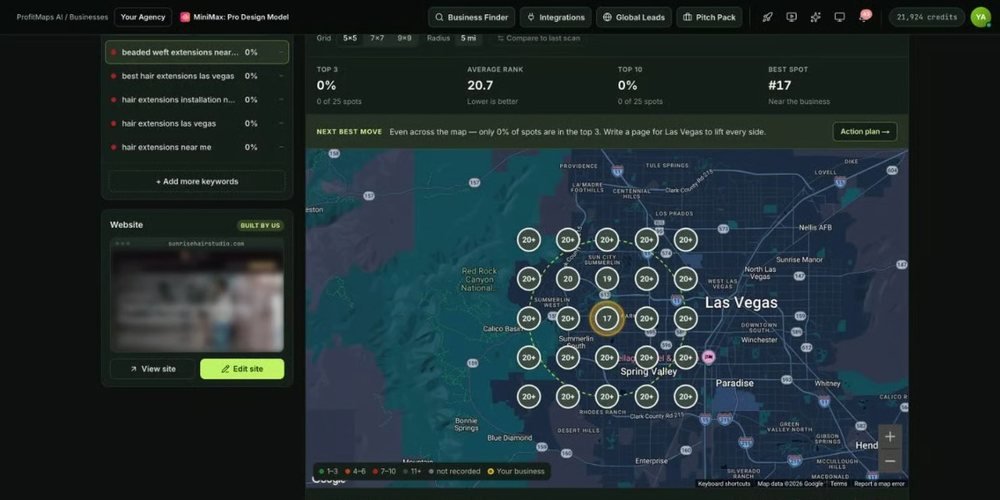
Here’s how a single scan becomes a client conversation in four steps:
➤ Step 1 — Pick a business. Any business on Google Maps works: a plumber, a dentist, a hair salon, a roofer or a café. Add it to your workspace with the keyword its customers search, such as “plumber near me” or “hair colour salon”.
➤ Step 2 — Scan its map. Press one button. The scan checks the real Google Maps results from 25 spots around the business (a 5×5 grid by default) and colors each one: green for the top 3, then “hard to find” for ranks 4 to 10, “buried” for 11 to 20, and “not found”. The scan box shows the grid, radius and credit cost before you run it, and a scan finishes in a few minutes.
➤ Step 3 — Send the report. Download a PDF or create a read-only share link that lasts 7, 30 or 90 days, or never expires. Your company name and logo are printed on it, and you can include the AI action plan. Ready-made message templates help you write the first note and a friendly follow-up.
➤ Step 4 — Offer the fix. When the owner asks “Can you fix that?”, use the action plan, the Google post writer, the article writer and the website generator to deliver the work. You set the price: a one-time fix, a monthly service or a monthly report, with recurring scans to show progress.

About The Creator


ProfitMaps AI is created by Chad Nicely, founder of Nicely Media and one of the most consistent software vendors in the JVZoo marketplace, together with his launch partner Karthik Ramani, a top-ranked affiliate and JV manager. Chad’s launches have taken first place on the leaderboards again and again, including SerpSling, Cinemation, AIFlipDomains, Agentic Agency, OneManArmy, Callfluent 2.0, FunnelHero AI, Vidicom, TubeClaw AI, CastAI, ContentClaw and Claw AI Army. Chad and Karthik last teamed up on OpenClaw Cracked in March 2026.
That track record shows in every corner of this app. The sales material is refreshingly honest about what the tool does and what you still do yourself, the app clips are recorded from the real product, the scan box shows the exact credit cost before you spend anything, and the article writer even flags claims the owner needs to confirm. Support runs 24/7 through Nicely Media’s help desk, and the training lives inside the app. It’s the kind of care that makes me comfortable recommending a Chad Nicely product.
ProfitMaps AI Review – Key Features
✅ Google Maps Grid Scans: Each scan checks a keyword from a grid of real map points around the business, 25 spots on the default 5×5 grid and up to 9×9 on Basic, and shows the exact rank at every dot. Owners instantly see where customers find them and where they disappear, which is something they can’t see by searching from their own shop.
✅ Competitor View: For every scan, you see which businesses beat your prospect across the map and how often. That turns a vague “you could rank better” into a concrete “Summit Plumbing wins 18 of these 25 spots”, which is far more persuasive in a first conversation.
✅ AI Action Plan: One click writes a short, numbered to-do list in plain English, based on that scan’s own numbers, such as building a page for a weak side of town. You don’t need any SEO knowledge to explain the next steps, and the plan doubles as the scope of the work you sell.
✅ Branded Reports And Share Links: Export a PDF report or a CSV of every scan point and the top competitors, with your company name and logo printed on it. Read-only share links can expire after 7, 30 or 90 days or stay live, so a prospect can open the report on their phone in seconds.
✅ Website Generator With Lead Capture: An AI site planner and builder creates local business websites with an editor, 10 sites on Basic. Every site collects enquiries into your leads inbox, and if a plan has no Contact page, the app warns you and adds one with a click.
✅ Google Post And Local Article Writers: Generate Google Business Profile posts by choosing a post type, a call to action and a keyword, and write local page articles for the areas where the business is weak. The article writer lists any claims the owner should confirm, so the content stays accurate.
✅ Keyword Finder And Ranking History: Type a website and a town to see what it already ranks for, then compare scans over time so the owner can see exactly what changed after your work. This is what makes a monthly report easy to sell and easy to renew.
✅ Recurring Scans And Notifications: Set a scan to repeat weekly or monthly. The box shows the cost per run and your balance, and the bell tells you when a scan has finished or a new enquiry has come in from one of your sites.
✅ AI Assistant Connection (MCP) And Mobile App Layout: Connect your own AI assistant to your ProfitMaps account to work with your data in chat, and run scans, check businesses and view your dashboard from your phone. It means you can scan a business while you’re standing outside it.
DEMO VIDEO
🎁Exclusive Vendor Bonuses
Every plan, Basic included, comes with two bonuses that take you from your first scan to your first client:
- Google Business Profile Course: a short, practical course on setting up and optimizing a profile, choosing categories and services, using photos, posts and reviews, and building local pages that support the map, so you have a clear answer when an owner asks what you’d actually do.
- 3-Day Hands-On Training: a live, recorded session held in launch week: find and scan (add your logo, pick a niche and town, list 10 businesses, run three scans), send and talk (send your first report, practise replies, set your price), and turn it into clients.
ProfitMaps AI Pricing & Funnel Summary
ProfitMaps AI Front End ($37)
The Basic plan costs $37 one-time on JVZoo, and after October 27 every plan moves to a monthly bill. It covers 10 businesses with 2 keywords each, scans up to 9×9, 10 websites, every writer and report tool, both bonuses and a starting pool of scan credits. A Pitch Pack with proposal templates and scripts appears as an order bump for about $17, and the purchase is covered by a 30-day money-back guarantee.
Is it worth it? Grid-rank tracking tools for local SEO usually start around $25 to $50 a month, and they give you the data without the report branding, the action plan, the content writers or the website builder. For a one-time $37, ProfitMaps AI covers the full path from first scan to delivered work. It’s a natural fit for freelancers, beginners who want a first local client, and marketers who already sell websites or social media to local businesses. Keep in mind that scans use credits, one per map point, so starting with the default 5×5 grid makes the starting pool go a long way, and Pro or the bundles add more room when you’re ready.
💡 Value-for-Money Rating: 9.5/10
At $37 once, you get a map scanner, branded reports, an AI action plan, content writers and 10 lead-capturing websites, where a rank-tracking subscription alone costs $300 or more a year. Local owners commonly pay $250 to $500 a month for Maps visibility work, so a single client covers the price many times over in the first month. The decisive edge is the picture itself: a map of their own town gets replies that a cold pitch never does.
👉 Get ProfitMaps AI At An Exclusively Discounted Price 📌
The Upsells:
➡️ OTO 1 — ProfitMaps AI Pro ($67): Pro makes the reports fully yours: set your company name and logo and hide the “Prepared with ProfitMaps AI” line, so every PDF and share link looks like it came from your own agency. It also expands your working room for scans, and it’s ideal for freelancers who want to look established from the very first report. A lighter Pro Starter version is offered for about $47 if you skip it.
➡️ OTO 2 — ProfitMaps AI Business Finder ($97): Business Finder lists the businesses of any type in a town for you, scores each one from 0 to 99, and filters for businesses with no website or no rankings. It turns prospecting from guessing into a ready list of owners who clearly need help, which suits anyone who wants to send reports every day. A Finder Lite version is offered for about $47.
➡️ OTO 3 — ProfitMaps AI Agency ($147) / Agency Plus ($297): Agency gives every client a workspace of their own, with an optional read-only portal login for the owner and team member seats for your helpers. Agency Plus raises the room for more clients and staff. It’s built for anyone who plans to run monthly Maps work for several local businesses at once.
➡️ OTO 4 — ProfitMaps AI 3-Day Live Workshop ($197): The full live workshop runs Monday 2 to Wednesday 4 November: Day 1 is find and scan, Day 2 is send and talk, and Day 3 is fix and keep. You work through the process step by step with the team, with recordings available, and it’s perfect for beginners who want guidance until their first client signs.
➡️ OTO 5 — ProfitMaps AI White Label ($297 / $497): White Label lets you offer ProfitMaps AI to your own clients as your service, with 10 client accounts on the $297 tier or 100 on the $497 tier. It suits agencies that want to give owners their own access and charge for it as part of a monthly package.
ProfitMaps AI Bundle Deal ($297 Gold / $697 Platinum): Is It Worth It?
Instead of the separate upgrades, you can choose one of two bundles at checkout: the Gold Bundle for $297 one-time or the Platinum Bundle for $697 one-time. Both are launch prices; after October 27, every plan becomes a monthly bill. Here’s exactly what’s inside:
Gold Bundle ($297), “Run it like a business”:
- ✅ Everything in Basic, with bigger limits: 50 businesses, 5 keywords each and 50 websites.
- ✅ White-label reports and email follow-up for new leads from your sites.
- ✅ Scan grids up to 20×20 with your own data key.
- ✅ Business Finder with a monthly search allowance.
- ✅ Agency tools: client workspaces, client logins and team members.
- ✅ Pitch Pack with proposal templates and scripts.
- ✅ The 3-Day Live Workshop and a larger pool of scan credits.
Platinum Bundle ($697), “Every cap removed”:
- ✅ Everything in Gold, including the 3-Day Live Workshop.
- ✅ Unlimited businesses, keywords and websites.
- ✅ Business Finder with unlimited searches (fair use).
- ✅ Agency tools with no caps on client workspaces or team members.
- ✅ All grid sizes (above 9×9 with your own data key) and the largest pool of scan credits.
Bought one by one at the listed launch prices, the closest match to Gold (front end, Pitch Pack, Pro, Business Finder, Agency and the Workshop) comes to $562. The Gold Bundle at $297 saves $265, about 47%, and adds the bigger limits and the larger credit pool. Gold suits freelancers who want to run this as a real business with several clients, a ready prospect list and branded reports. Platinum suits established agencies that plan to scan dozens of businesses and add staff. A beginner who wants to test the idea on a handful of local businesses will be well served by the $37 Basic plan, adding Pro later.
Keep in mind that scans use credits on every plan, Platinum included: each bundle gives you a larger starting pool, and you can buy more credits or connect your own data key, which is also what unlocks grids above 9×9. The White Label client accounts are a separate upgrade, so agencies who want to give owners their own access can add them on top.
💡 Bundle Value Rating: Gold 9.5/10 for freelancers and small agencies, Platinum 9.2/10 for established agencies
Gold puts Pro-level reports, Business Finder, agency tools, the Pitch Pack and the live Workshop into one $297 payment, about 47% less than buying them one by one, and one monthly client pays it back. Platinum is the right call when you plan to scale without limits. If you’re testing the idea first, the $37 Basic plan does the core job beautifully.
👉 Get ProfitMaps AI Bundle Offer And Coupon Code Right Here! 📌
Why Should You Choose ProfitMaps AI?
My Personal Experience With ProfitMaps AI
I don’t run an agency, so I wanted to see whether a complete beginner could land a client with this. I gave myself a small project called “The Riverside Map Check”: list 12 local businesses along the main road in my town’s riverside district, scan each one, send the reports and see who replied. I added my logo, picked three niches I walk past every day (home services, health and beauty) and followed the seven-day starter plan.
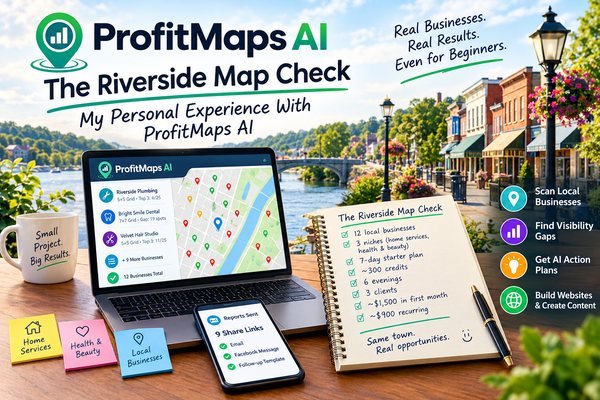
Here’s what “The Riverside Map Check” looked like, business by business:
- Scan 1 — Riverside Plumbing: “plumber near me” on a 5×5 grid. Top 3 in only 4 of 25 spots, buried across the whole east side. The action plan suggested a service page for the east side and weekly Google posts.
- Scan 2 — Bright Smile Dental: “dentist near me” on a 7×7 grid. Strong near the clinic, not found in 19 spots to the north, where a competitor won almost every point. The competitor view made the gap obvious in one glance.
- Scan 3 — Velvet Hair Studio: “hair colour salon” on a 5×5 grid. Hard to find in 14 spots. The plan recommended photo posts and a dedicated colour services page, which I built with the website generator.
- Scans 4 to 9 — Roofer, Locksmith, Physio, Nail Bar, Barber, Pet Groomer: two of them already ranked well almost everywhere, so I moved on; the other four had clear red zones worth a message.
- Scans 10 to 12 — Café, Florist, Gym: the florist had no website at all, so the report went out with a sample one-page site the generator built from its Google listing.
- Reports — 9 Share Links Sent: 30-day links with my logo and the action plan, sent by email and Facebook message using the first-message template, followed by the friendly nudge four days later.
The scans used a little over 300 credits in total, and the whole project took about six evenings. I edited each AI action plan lightly so it sounded like me, and I checked the claims the article writer flagged with each owner before publishing anything, which is normal care for any AI draft. Four owners replied, and three of them asked exactly the question I was hoping for: “Can you fix that?”
Within the first 16 days, I signed 3 clients: Riverside Plumbing on a $350 monthly plan with posts and a new service page, Bright Smile Dental with a $600 one-time fix plus $300 a month, and Velvet Hair Studio on a $250 monthly report. That came to approximately $1,500 in the first month, with around $900 a month recurring after that. The recurring scans now show each owner their progress automatically, and I’m already planning the next 12 businesses.
Who Should Use ProfitMaps AI?
- Freelancers looking for a first local client: scan businesses you already know, send a branded map and start the conversation with something genuinely useful.
- Local SEO consultants: replace a monthly rank-tracking subscription with grid scans, competitor views and ranking history for every client.
- Web designers: show owners where they’re invisible, then build the fix with the website generator and lead capture.
- Social media managers: add Google Business Profile posts and monthly map reports to your existing packages.
- Small agencies: use client workspaces, team seats and white-label reports (Gold and Platinum) to run Maps work for many businesses at once.
- Local business owners: scan your own business from every side of town and use the action plan and writers to improve it yourself.
- Side-hustlers with a few evenings a week: follow the seven-day starter plan and the 3-day training to build a small monthly-report service.
Common Questions About ProfitMaps AI
- Do I need a website or any SEO skills?
No. You pick a business, run a scan and send the link. The tool writes the report and the next steps. - Is it a monthly fee?
No, it’s one payment per plan during the launch. After October 27, every plan becomes a monthly bill. - How long does a scan take?
A few minutes. You can watch the progress and the time left on the scan page. - What are credits?
One credit per map point, so a 5×5 scan uses 25 credits and a 7×7 scan uses 49. - Do I need access to the client’s Google account?
Not for scans or reports. The Google posts are written ready to copy and paste. - Can I use it on my own business?
Yes, it works just as well for checking and improving your own Maps visibility.
Comparison Table: ProfitMaps AI vs. Alternatives
| Option | Cost | Grid Map Scans | AI Action Plan | Builds The Fix (Sites, Posts) |
|---|---|---|---|---|
| ProfitMaps AI | $37 one-time | Yes | Yes | Yes |
| Grid rank-tracking subscriptions | $25+/month | Yes | Sometimes | No |
| All-in-one local SEO suites | $40+/month | Add-on | Sometimes | No |
| Manual checking from your own phone | Free | No (one location only) | No | No |
Pros and Cons of ProfitMaps AI
- ✅ Real Google Maps grid scans that owners understand in seconds.
- ✅ Branded PDF reports and share links with an AI action plan in plain English.
- ✅ Website generator, lead capture, Google post and article writers to deliver the fix.
- ✅ Two bonuses, including the 3-day hands-on training, come with every plan.
- ✅ The Gold Bundle saves about 47% compared with buying the same upgrades one by one.
- ⚠️ Scans use credits on every plan; starting with 5×5 grids stretches the pool, and more credits or your own data key are easy to add.
- ⚠️ A quick read of the AI plans and articles before sending keeps every claim accurate for the owner.
Final Verdict on ProfitMaps AI
ProfitMaps AI gives you a simple, honest way to start conversations with local business owners: show them their own map, then offer the fix. For $37 one-time with a 30-day guarantee and the hands-on training included, it’s an easy recommendation for freelancers, web designers and beginners who want their first local client. If you plan to work with several clients, the Gold Bundle is the smooth route, and established agencies will get the most from Platinum. In my opinion, ProfitMaps AI is worth considering, especially while the one-time launch pricing is still available.
That’s all what I want to share with you about ProfitMaps AI. I hope that my review can give you a helping hand in deciding what is best for you.