

Quick Summary
- Product: StoryStream
- Creator: Owen Bennet (KoJi Academy)
- Front-End Price: $17 one-time launch price (goes up to $47 after launch) 👉 Amazing Discounted Price Right Here! 📌
- What You Get: A Windows and Mac desktop app with 9 AI staff that turn each book chapter into a narrated long video, a Short, a thumbnail and YouTube metadata
- Runs With: Your own paid Claude Pro or Max plan; voices are free and offline
- License: Personal license for your own channels and business
- Upsells: Four upgrades
- Guarantee: 30-day refund plus an “It Works As Shown” promise
- Category: AI book-to-video desktop app
Every week, readers go looking for book summaries, chapter readings and story videos, and short vertical clips have become one of the main ways people discover new titles. YouTube’s own press page describes Shorts views in the billions every day. For an author or a book channel, though, each video means six separate jobs: script, voice, visuals, editing, a Short and the title-and-thumbnail work.
StoryStream hands those six jobs to a team of nine AI staff on your own computer. I used it to launch a weekly channel built on a public-domain Victorian mystery, so in this review I’ll walk you through how it works, every feature, the price, all four upgrades and what that channel has done so far.
What Is StoryStream? How Does It Work Step By Step?
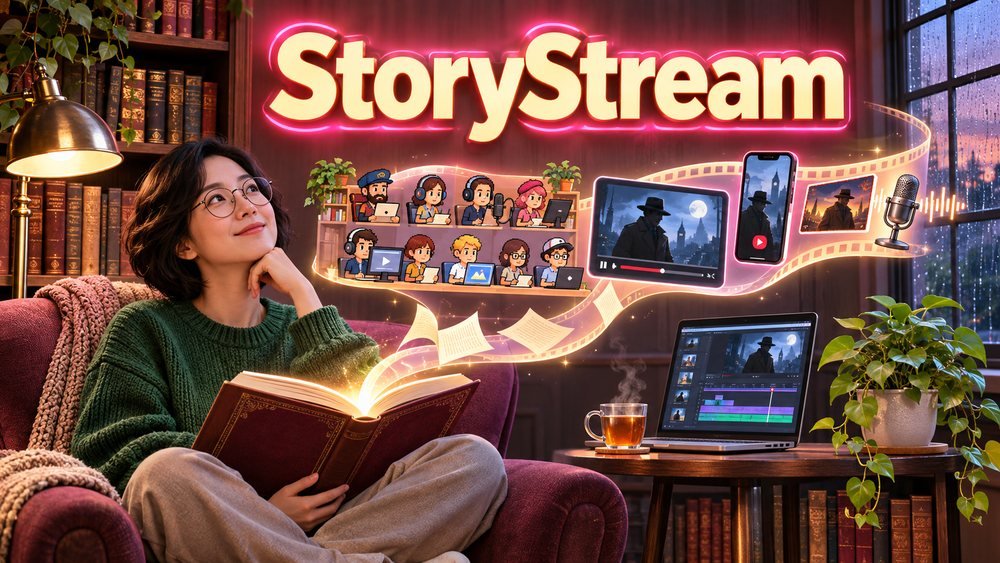
StoryStream is a desktop app for Windows and Mac that turns the chapters of a book you own (or a public-domain book) into a complete YouTube package: a narrated long video with captions and chapters, a vertical Short, a thumbnail, and a title, description and tags. Inside a charming pixel-art office, nine AI staff (a Director, Shorts Writer, Scriptwriter, Voice Actor, Illustrator, Video Editor, Thumbnail Designer, SEO Writer and Publisher) each handle their part of the job, powered by your own Claude plan.

Here’s the step-by-step flow as I worked through it:
➤ Step 1 — Drop The Book. Load a PDF, EPUB or DOCX file and StoryStream splits it into chapters, or paste in an excerpt.
➤ Step 2 — Pick A Look And Length. Choose one of 12 looks and a length that fits the text, or about 3, 6 or 10 minutes. You see a time estimate before anything starts.
➤ Step 3 — Watch The Team Work. The Scriptwriter, Voice Actor, Illustrator and Video Editor build the long video while the Shorts Writer prepares the vertical clip and the Thumbnail Designer and SEO Writer finish the packaging.
➤ Step 4 — Check The Result. Review the video, the Short, the thumbnail and the metadata in the chat windows and the Director’s final report.
➤ Step 5 — Post Or Schedule. Upload it yourself, or let the optional Publisher schedule it, private by default, up to three videos a day.
About The Creator

StoryStream is created by Owen Bennet of KoJi Academy (also known as KoJi Launch), a publishing-focused brand that builds tools, bonus packs and resources for self-publishers and KDP authors. The KoJi Academy library already includes 26 bonus packs, 16 AI tools and 11 guides and templates for authors.
Owen’s care for his buyers shows throughout this release. The app installs everything it needs (Claude Code, Git, Node and the voices) in a guided setup, includes a Light Mode for modest 8 GB laptops, shows time estimates before each job, keeps all files in your own folder with no tracking, and includes 12 months of free updates with email support. He’s also unusually clear about requirements and rights, which builds a lot of trust. It’s a thoughtful product from a creator who clearly understands authors.
StoryStream Review – Key Features
✅ Nine AI Staff In A Pixel-Art Office: Each role has its own desk and report: the Director plans, the Scriptwriter adapts the chapter, the Voice Actor narrates, the Illustrator and Video Editor build the visuals, and the Thumbnail Designer, SEO Writer and Publisher finish the job. You can watch the work happen and see exactly who did what.
✅ A Full YouTube Package Per Chapter: Every chapter returns one long video with captions and chapter markers, one vertical Short, a thumbnail and a ready title, description and tags. That’s a week of content from a single chapter, without opening an editor.
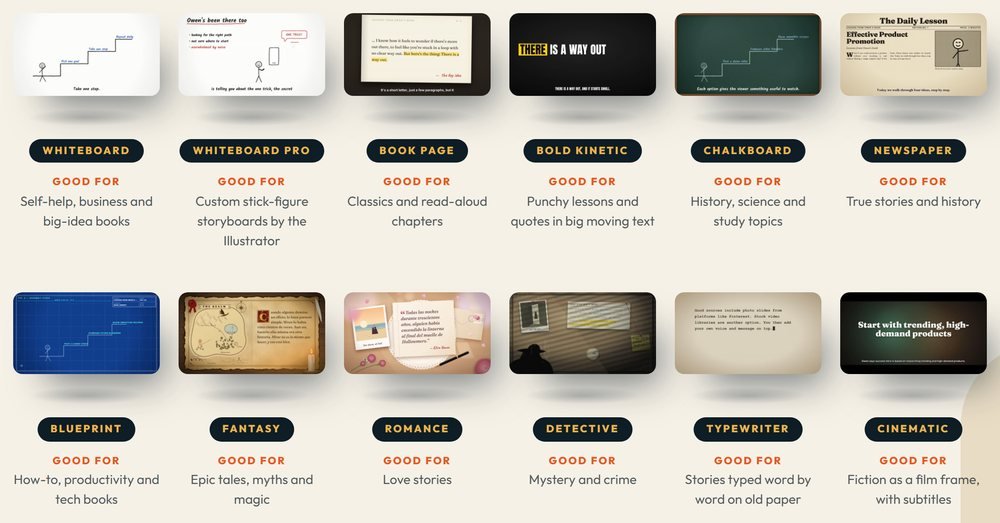
✅ 12 Looks For Every Kind Of Book: Seven looks suit lessons and non-fiction (Whiteboard, Whiteboard Pro, Book Page, Bold Kinetic, Chalkboard, Newspaper and Blueprint), and five suit fiction (Fantasy, Romance, Detective, Typewriter and Cinematic). Matching the look to the genre makes a channel feel instantly professional.
✅ Flexible Video Lengths: Let the video fit the text, or choose about 3, 6 or 10 minutes. Short readings suit busy viewers, and 10-minute videos suit chapter-by-chapter series.
✅ Free Offline Voices: Narration uses free Kokoro voices that run on your own machine, so there are no voice credits or per-minute fees. Two English narrators come with the front end, and StoryStream Pro opens every voice in six languages.
✅ Runs On Your Own Computer: Windows and Mac versions are included, a guided installer sets everything up, and Light Mode handles 8 GB, 4-core machines. On my laptop a video took about half an hour; on a strong desktop it’s closer to 5 to 10 minutes.
✅ Light On Your Claude Plan: Each video uses about 5 to 8% of your Claude five-hour limit, so a Pro or Max plan comfortably covers a weekly series. A time estimate appears before you start.
✅ Optional Publisher: The Publisher can upload and schedule your videos, private by default with Unlisted or Public as options, up to three per 24 hours. Or simply download the files and post them yourself.
✅ Private And Yours: Files stay in your own folder, there’s no tracking or analytics, and you own the videos, Shorts and thumbnails you make.
DEMO VIDEO
🎁Exclusive Vendor Bonuses
- “One Book → 30 Videos” Series Planner: a PDF and spreadsheet for mapping one book into a month of videos.
- Book Shorts Hook Vault: 50 hooks and 30 thumbnail-text templates.
- Public-Domain Starter Library: 50 Project Gutenberg books grouped by niche, ready to turn into a channel.
StoryStream Pricing & Funnel Summary
StoryStream Front End ($17)
I paid $17 once through WarriorPlus at the launch price, which goes up to $47 after launch, and my download page appeared right after checkout. The front end is the Personal License: Windows and Mac apps, all 9 AI staff, 12 looks, the Publisher, the three bonuses and 12 months of updates for your own channels. You run it with your own paid Claude Pro or Max plan, billed by Anthropic. A 30-day refund applies, plus an “It Works As Shown” promise if support can’t fix a problem on a supported system.
Is it worth buying? A freelance editor charges well over $50 for a single narrated video with a thumbnail, and AI video and voice tools often bill monthly by the minute. Here, one payment covers unlimited chapters on your own machine with free voices. It’s a natural fit for authors who want their own book on YouTube and creators building a channel around public-domain classics. If you’d like more voices, languages or channels, StoryStream Pro is the easy next step.
💡 Value-for-Money Rating: 9.2/10
At $17 once, StoryStream turns every chapter into four finished assets (a long video, a Short, a thumbnail and SEO text), work that would cost $50 or more per video from a freelancer. My first nine chapters became 18 uploads in under a month, all with free offline voices and no render fees. For an author or book channel, a single book can fill a month of content, and every new book adds another.
👉 Get StoryStream At An Exclusively Discounted Price 📌
The Upsells:
➡️ StoryStream Pro ($37): Unlocks every narrator voice, male and female, and adds five languages (English UK, Spanish, French, Italian and Portuguese) to English US, plus up to three YouTube channels (up from one). The same 9 AI staff and 12 looks carry over. Ideal for creators who want a different voice for each genre or separate channels by niche or language.
➡️ StoryStream Premium ($67): Includes everything in Pro and adds whole-book summary videos of about 6, 10 or 15 minutes, with the Director showing the chapter count, word count, estimated time and Claude usage before starting. A posting calendar spreads uploads across channels, with optional private-first auto posting. Perfect for creators running two or three book channels.
➡️ StoryStream Agency ($67): A commercial license that works with Personal, Pro or Premium. You can take paid video work for authors, coaches, publishers and businesses at your own rates, and sell your videos, Shorts, thumbnails and scripts as PLR packs, with ready-to-copy PLR license text for your buyers. Great for anyone turning StoryStream into a service.
➡️ StoryStream Golden Key ($17/Month or $97/Year): Membership to the KoJi Academy library of 50+ items, including 26 bonus packs of journals, planners, covers and clipart, 16 AI tools and 11 guides, templates and checklists you can download and keep, plus a VIP dashboard, member community and support line. Yearly members also get everything added during their year. Built for self-publishers and KDP authors.
Why Should You Choose StoryStream?
My Personal Experience With StoryStream
One of the books in the Public-Domain Starter Library caught my eye straight away: Wilkie Collins’s 1868 novel The Moonstone, often called the first great English detective novel. It’s full of cliffhangers, which seemed perfect for weekly episodes. So, running StoryStream on my 8 GB laptop in Light Mode, I launched “Moonstone O’Clock”, a YouTube channel that releases one chapter-length episode every Tuesday at seven in the evening, in the Detective look, with a companion reader’s guide sold on Gumroad.

I used the Series Planner to group the novel’s chapters into episodes. Here’s how the first weeks of “Moonstone O’Clock” were laid out:
- Episode 1 — The Diamond Arrives: Gabriel Betteredge introduces Lady Verinder’s house and the cursed Indian diamond, a 10-minute video with a Short built around the line “a diamond that brings bad luck.”
- Episode 2 — Three Strangers At The Gate: the mysterious jugglers and the ink-in-the-palm scene, with a thumbnail of a glowing gem and a dark doorway.
- Episode 3 — The Birthday Night: Rachel’s eighteenth birthday dinner and the moment the diamond disappears, cut as a 6-minute episode with a cliffhanger Short.
- Episode 4 — Sergeant Cuff And The Smear: the famous detective arrives and studies a smudge of paint on a bedroom door, the clue that drives the whole mystery.
- Episode 5 — The Shivering Sand: the quicksand on the coast and Rosanna Spearman’s secret, narrated in a slower, quieter style.
- Episodes 6–9 — The Second Narrative: the switch to Miss Clack’s comic, gossipy account, where I chose the Typewriter look to mark the change of narrator.
Each video took about 30 minutes on my laptop and used roughly 6% of my Claude limit. I reviewed every script, trimmed a few long passages and occasionally asked the Director for a pacing change, a normal polish that kept the episodes tight and faithful to the book. The SEO Writer’s titles, such as “The First Detective Novel Ever Written — Episode 1,” worked well, and I added hooks from the Shorts Hook Vault to the vertical clips.
In the first four weeks, “Moonstone O’Clock” published nine episodes and nine Shorts and reached around 186,000 views and 1,350 subscribers. The companion reader’s guide, with character maps and a clue tracker, sold 140 copies at $9, approximately $1,260, and a free “spot the clue” printable added 420 readers to my email list.
Who Should Use StoryStream?
- Self-published authors: turn every chapter of your own book into videos and Shorts that send viewers to your Amazon page.
- Book and story channel creators: build a weekly series from public-domain classics in a look that matches each genre.
- Non-fiction writers and coaches: use the Whiteboard, Chalkboard or Blueprint looks to turn lessons into explainer videos.
- Faceless YouTubers: publish narrated long videos and Shorts without recording your voice or appearing on camera.
- Educators: create chapter-by-chapter reading videos for literature classes and study groups.
- Video service providers: offer book-to-video packages to authors with the Agency license.
Common Questions About StoryStream
- Are there monthly fees?
Not from the vendor. You need your own paid Claude Pro or Max plan, and the voices are free and offline. - Does it work on Mac?
Yes, both Windows and Mac versions are included. - How long does each video take?
About 25 to 32 minutes on a modest 8 GB laptop, and around 5 to 10 minutes on a strong desktop. - Can I use any book?
Use books you own or have rights to, or public-domain titles like those in the Starter Library. - Does it post to YouTube automatically?
Optionally. The Publisher uploads privately by default, up to three videos a day, or you can post yourself. - Can I make videos for clients?
Client work needs the Agency license; you always own the videos you create.
Comparison Table: StoryStream vs. Alternatives
| Option | Cost | Video + Short + Thumbnail + SEO | Voice Cost | Files Stay Private |
|---|---|---|---|---|
| StoryStream | $17 one-time + your Claude plan | All four | Free, offline | Yes |
| Freelance video editor | $50+ per video | Usually | Extra | Shared files |
| Online AI video tools | $20–$60/month | Video only | Credits | Cloud |
| Doing it yourself | Your time | Six separate jobs | Your microphone | Yes |
Pros and Cons of StoryStream
- ✅ Every chapter becomes a long video, a Short, a thumbnail and ready YouTube metadata.
- ✅ 12 looks covering non-fiction and fiction genres.
- ✅ Free offline voices and no render fees.
- ✅ Runs privately on Windows or Mac, with Light Mode for modest laptops.
- ✅ Three practical bonuses, including 50 public-domain books to start a channel.
- ⚠️ It runs with your own Claude Pro or Max plan, and each video uses only about 5 to 8% of the five-hour limit.
- ⚠️ The front end includes two English narrators and one channel; StoryStream Pro adds every voice, six languages and three channels.
Final Verdict on StoryStream
StoryStream turns a book into a steady YouTube series, handing script, voice, visuals, editing, Shorts and SEO to nine AI staff on your own computer. For $17 once at launch, it’s a smart pick for authors and book-channel creators who want consistent, good-looking videos without a production team. If you’d like more voices and languages, pairing it with StoryStream Pro is the smooth route. In my opinion, StoryStream is worth considering, especially while the launch price is still available.
That’s all what I want to share with you about StoryStream. I hope that my review can give you a helping hand in deciding what is best for you.